Your Anki, with the Cutline deck.
Switch your papers on and every lecture's cards land in Anki. Hover a word while you review and the definition comes to you.
The [...] sets the resting heart rate.
The sinoatrial node sets the resting heart rate.
It sits in the right atrium and depolarises first, about 60 to 100 times a minute.
One deck, kept by med students.
The Cutline HSFY 2026 Deck is written and checked by Otago med students who sat these papers. A subdeck per paper, every lecture inside, and new lectures join as they come out. Your own decks are never touched.
 Cutline HSFY 2026 Deckpinned first in your deck list
 HUBS192
 BIOC192
 POPH192
 STAT115
 MAOR102
 MATH130
Three steps, about two minutes.
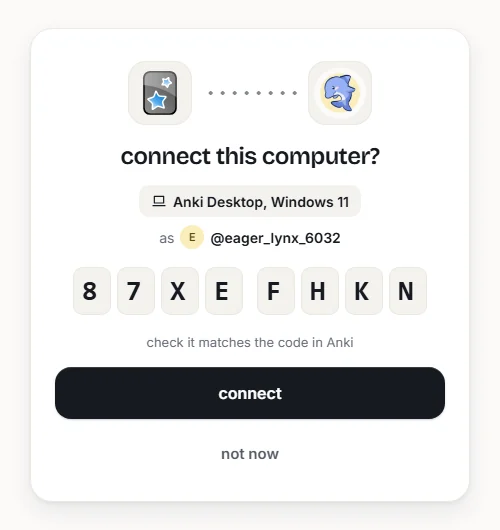
Connect on Cutline
Anki shows a short code and opens Cutline. Approve it and the two are paired. Your password never goes into Anki.
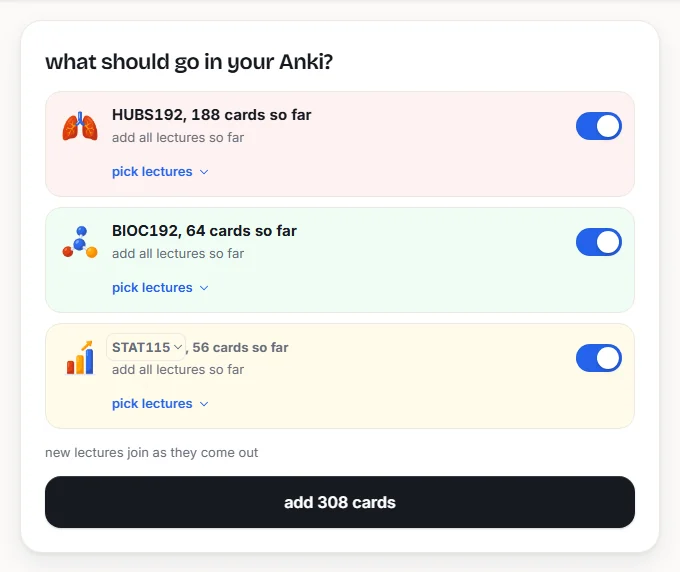
Pick your papers
Switch a paper on, or pick lectures inside it. You see every card before anything is sent.
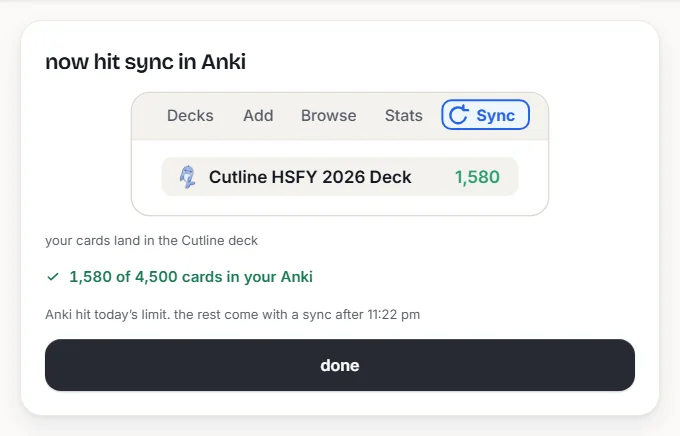
Tap Roro in Anki
The cards land in the Cutline deck. From then on new lectures and corrections arrive on their own while Anki is open, and your reviews stay yours.
Install it on your laptop.
Cutline Connect is on AnkiWeb. Install it from inside Anki with the code below.
Early access while Cutline Connect waits for its AnkiWeb listing. Same add-on, installed from a file.
- 1
Get Anki
Free on Mac, Windows and Linux. Version 25.02 or newer. Skip this if you have it.
- 2
Add Cutline Connect
Download the add-on, then in Anki open Tools, Add-ons, Install from file and pick it.
In Anki open Tools, Add-ons, Get Add-ons and paste the code.
1558263595on AnkiWebDownload the add-onearly access, a .ankiaddon file - 3
Restart Anki and connect
Open Tools, Cutline Connect, Connect to Cutline. Anki shows a code and opens Cutline. Approve it.
- 4
Pick your papers and tap Roro
On Cutline, switch on the papers you want. Back in Anki, tap Roro in the toolbar. The cards land in the Cutline HSFY 2026 Deck.
Questions people ask.
Something else? Email [email protected].
No. The add-on only reads and writes the cards it made, in the Cutline HSFY 2026 Deck. Your own notes, decks, exports and review history are never read or uploaded.
Your edit stays. If Cutline later corrects that same card, Anki shows both versions and asks which to keep, and nothing changes until you choose. For your own words on a card, every Cutline card has a Personal Notes field that updates never touch.
They stay. A correction changes the text in place, so the card keeps its scheduling, review history, flags, tags and Personal Notes. Updates arrive as updates, never as duplicates.
The cards do. The add-on itself runs on Anki Desktop, so set it up once on a laptop, then Anki's own AnkiWeb sync carries the cards, and every update, to AnkiMobile, AnkiDroid or AnkiWeb. Definitions on a phone are a switch in Tools, Cutline Connect, Settings.
Your papers arrive in one sync. If a sync ever stops partway, the Roro icon in Anki's toolbar shows an amber dot and the rest come with the next sync, with no dialog in the way. How many new cards you see a day is Anki's own setting, 20 by default.
The add-on is free, and so is Anki Desktop. Cards from the free lectures come through without a pass. Cards from paid lectures need the paper's pass, the same one that opens them on Cutline. If a pass ends, your cards stay in Anki with your reviews, and new lectures and fixes resume when you renew.
Yes. It works the same for every Cutline account, and nothing from Anki goes anywhere social. Signing in never puts your password into Anki: Anki shows a code, you approve it on Cutline. The privacy settings on your Cutline account stay exactly as they are.
No. When you export a deck or notes, Cutline cards are left out and Anki says so. Your own cards export as normal. A full collection backup still includes them, so you can always restore your own Anki. Each card also carries marks unique to your account.
In Anki: Tools, Cutline Connect, Settings, then Disconnect. The cards you already have stay in Anki with their history. From the other side, Cutline's Anki page lists every connected computer with a Remove button.
Anki 25.02 or newer, on Windows, Mac and Linux. An older Anki will not load the add-on, so update first.
Your Anki, with the Cutline deck.
Install the add-on, approve one code, and the cards are there.
Get it free